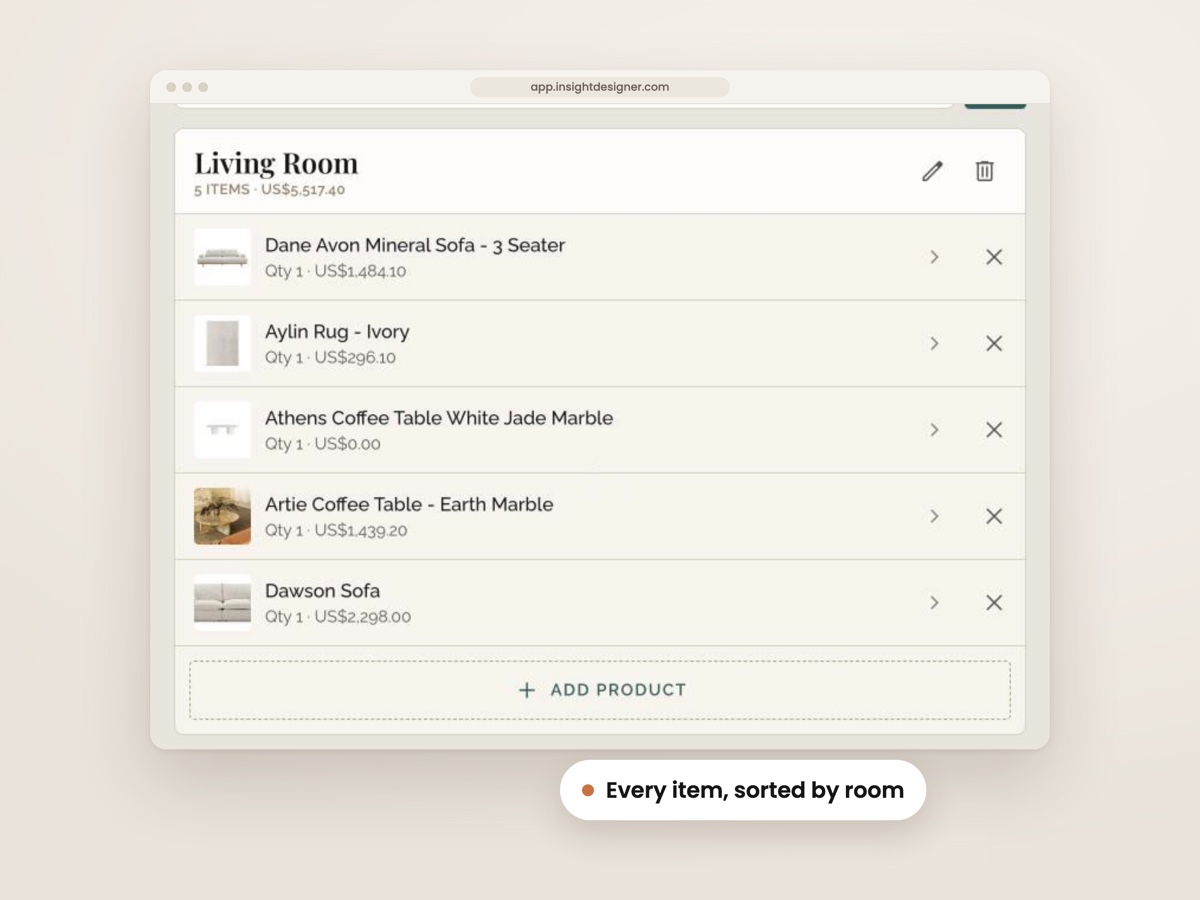
Projects By Room
Every Product In Its Room
Pick from 11 standard rooms, or add the ones your studio uses.
- Turn off the rooms you never use
- Assign each product to the room it belongs in
- Regroup the schedule by room, brand or category
No credit card required. Set up in 10 minutes.
A new client signs, and the first thing that happens is a fresh copy of the last FF&E schedule.
Then the pendant you specified last month goes in again, size and finish and all, along with the trade price you have to go and look up a second time.
Before anything reaches the client, the trade price and margin columns get hidden by hand, and there's always one more look to make sure nothing slipped through.
Then the prices live in one file, the client PDF in another and last month's job in a third, so half the afternoon goes on finding things instead of designing them.
None of that means the studio is disorganised, it just means a spreadsheet was only ever built to hold one job, and it starts from nothing every time.
It's a common problem, too. Nearly 1 in 5 interior design firms weren't sure how much profit they'd made, and the researchers linked it to running on general office software and paperwork (Pearl Collective Interior Design Business Survey, 2023).
AI has already cut the time spent on concepts and presentations, but the paperwork behind them still takes as long as it always has (Chaos and Architizer survey, 2026). So if the schedule still eats the same hours it always did, that isn't just you.
The fix isn't working faster, it's running every project from one place, where each product is entered once, priced once and pulled into whichever job needs it next.
Newer tools can even read a supplier's product page for you and fill the details in from a pasted link, so there's very little typing the first time either.
And when the client's copy is built without the trade price on it in the first place, there's nothing left to hide by hand.
And with everything in one place, the hours that went on typing, hunting and hiding go back into the design itself.
Free for life for anyone who joins now. No credit card required.
This is that one place, built into a free plan for one designer with 2 projects live at a time, and nothing on it expires.
Every Product In Its Room
Pick from 11 standard rooms, or add the ones your studio uses.
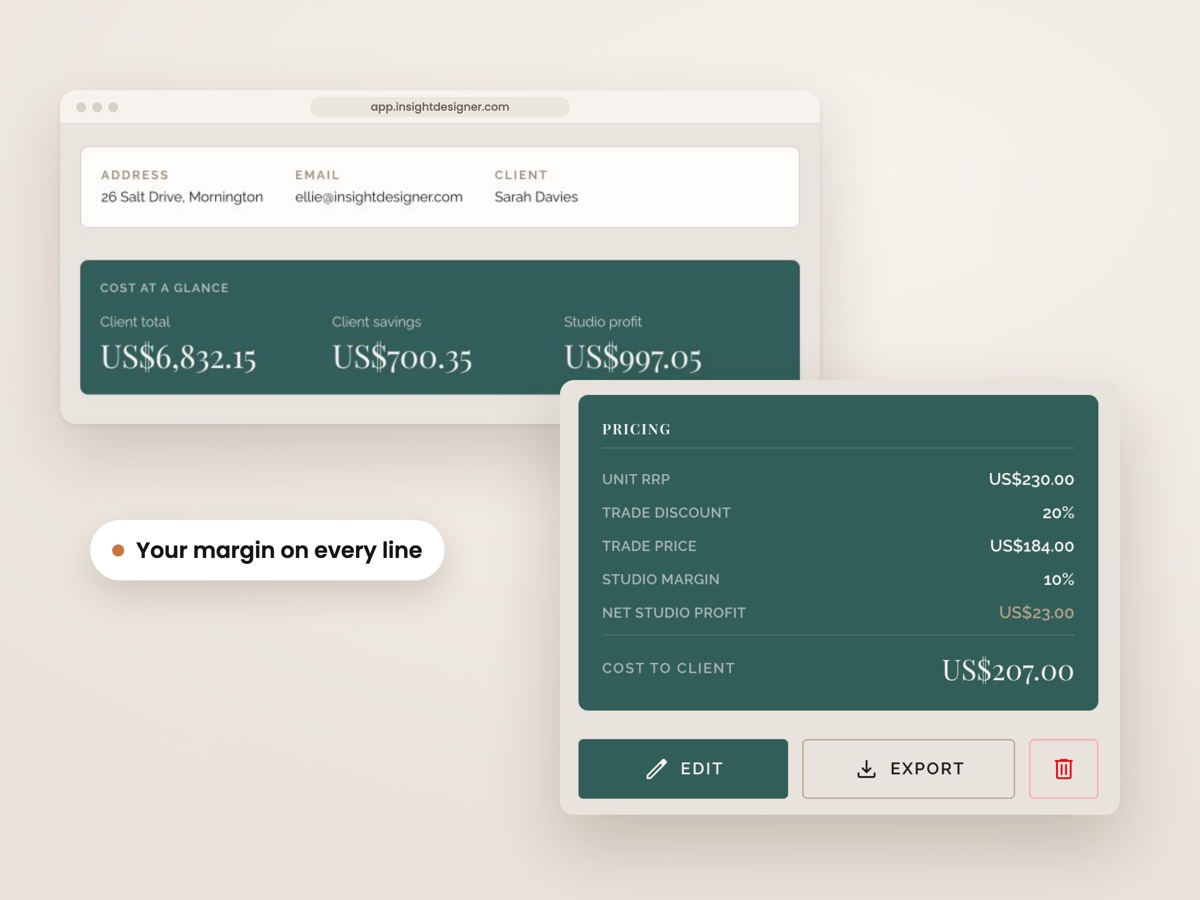
Your Margin On Every Line
Every line holds trade and client price, with the margin worked out.
No Columns To Hide
Specification schedule, client cost report and internal cost report, unlimited.
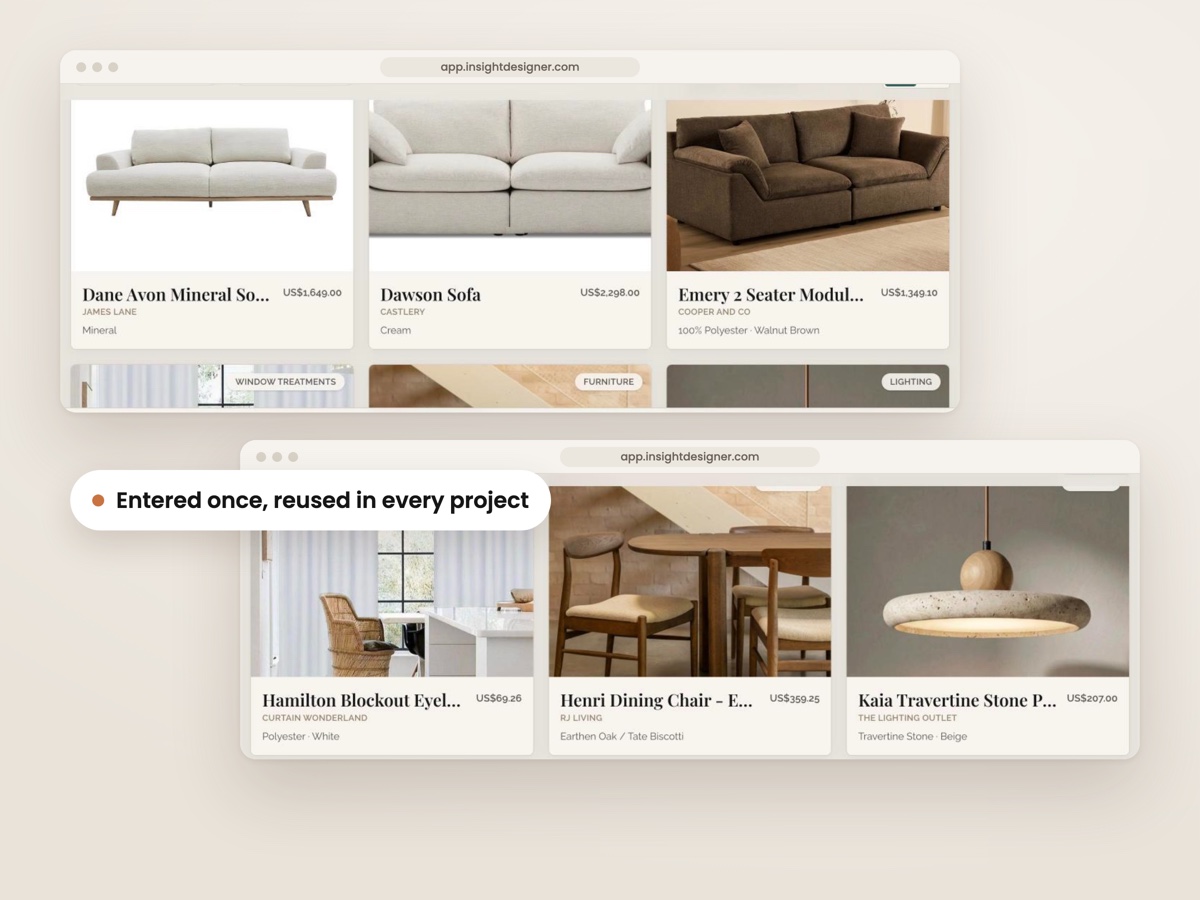
Enter Each Product Once
Every product you save lives in one library, ready for any project.
Product Details From A Link
The app reads the supplier's page and fills the details in.
1 Link For Client Approval
Send a project from the preview screen to a client share page.
Archiving Frees A Slot
Archiving a finished job frees its slot, with no swap limit.
Free for life for anyone who joins now. No credit card required.
This is what the first job looks like, and every job after it, starting from one pasted supplier link.
Sign up with no credit card, start a project for a job you have on right now, and paste a supplier link. The name, size, price and images fill themselves in.
Pull products into each room, set the trade and client price, and watch the margin and the client's savings work themselves out. Then send the PDF or a share link.
Each product you save stays in your library, so on the next job the pieces you've specified are ready to pull in. Finished jobs are archived and kept for good.
Free for life for anyone who joins now. No credit card required.
The big FF&E apps put projects in one place too, but charge every month, per person, and take a lot of learning first.
This puts each project's products, prices and client documents in one place for $0, simple enough to start on a real job the same day.
It works because a monthly bill and a long setup are the two things that stop designers switching, and neither is here. What goes in stays the studio's to open and export, whether or not it ever pays.
Free for life for anyone who joins now. No credit card required.
Ellie made spreadsheet FF&E schedules for interior designers first, so she knows exactly where a spreadsheet stops helping.
I'm Ellie, a former architectural designer in Australia with ten plus years' experience. Before this app, I made FF&E schedule spreadsheets for interior designers, and Insight Design still sells those.
A spreadsheet does the job, but it only ever holds one project. So the lamp you specified last month gets typed in again, and the margin columns get hidden by hand before the client sees anything.
That's why I built this: one place for every project, where a product is entered once and the client's copy never has the trade price on it.
Free for life for anyone who joins now. No credit card required.
$0, for life, no credit card
An FF&E schedule where each product goes in once and into every project after that, usable in about 10 minutes.
What's included:
Online, in the browser. Sign up and start a project the same day.
Free for life for anyone who joins now. No credit card required.
5 Calculators For The Studio
Calculators for your fee, a client's budget, quantities, space planning and what your software really costs. They're emailed to you the moment you sign up, free with your account.
Three ways to run an FF&E schedule, side by side, with the free plan's limit left in, because it belongs in the comparison too.
| Feature | Insight Free | A spreadsheet | The big monthly FF&E apps |
|---|---|---|---|
| Cost for one designer | $0 a month, no credit card | $0 | From about $55 to $99 a month |
| Enter a product once, use it in every project | ✓ | ✗ Copied file to file | ✓ |
| Fill in a product from a supplier link | ✓ Unlimited | ✗ | ✓ |
| Margin kept off the client's PDF without hiding columns | ✓ | ✗ Hidden by hand | Varies by app |
| Totals and margin update as you type | ✓ | ✓ While the formulas hold | ✓ |
| Projects open for editing at once | 2, archive one to swap | As many as you like | Depends on the plan |
Swipe the table sideways to see every column.
Monthly app prices are the entry plans for one designer, read from their own pricing pages in October 2026. One of them also offers a free plan.
Free for life for anyone who joins now. No credit card required.
What a free FF&E schedule is worth over a year, counted in typing skipped and monthly fees not paid.
The first client PDF goes out with no columns to hide, and from the second job on, every clipped product is ready to pull in. Against $55 to $99 a month, that's $660 to $1,188 a year not spent on software, while 2 live projects at a time is enough.
Free for life for anyone who joins now. No credit card required.
A fair worry, so here's exactly what stays free and what paying adds.
Plenty of designers have lost work inside software, or been stuck in contracts they couldn't leave.
On the free plan, your products, clients and finished projects stay yours to open and export for good. Paying only adds more live projects, team seats and your own branding. Nothing you've built gets locked away.
Free for life for anyone who joins now. No credit card required.
Free accounts can close to new sign-ups at any time, but an account opened now has no end date and no credit card on file. It keeps 2 projects live at a time, an unlimited product library, unlimited client records and every archived job, still viewable, exportable and shareable.
It's all written down in plain words in the Free Plan Terms.
Free for life for anyone who joins now. No credit card required.
No. There's no clock, no end date and no credit card on file. Nothing expires, nothing switches off, and everything you build in it stays yours to open and export. The Free Plan Terms set it out.
You archive a finished one, which frees its slot. The archived project stays viewable, exportable and shareable, and you can swap it back live whenever it needs an edit, as often as you like. If you'd rather keep 3 or more open at once, that's the paid plan.
It's US$49 a month, billed monthly, for when the studio grows. It adds unlimited live projects, team seats with their own logins, your own studio branding on client documents with no "Made with Insight" line, your product list imported for you, and priority support. You buy it and cancel it inside the app.
No. The client cost report doesn't have a trade price or profit field at all, so there's nothing to forget to hide. Clients can see what they save against RRP, while your profit sits in a separate figure their view never gets. The Notes field is internal too.
It means normal, everyday design work, with no counter ticking down on screen. The only accounts that can be slowed or paused are ones showing unusual activity, like bots, scraping, or one login shared across many people.
It's one small line in the footer of client documents on the free plan. The paid plan takes it off and puts your own colours, fonts and studio mark on the PDFs, the share page and client emails instead.
On the free plan, yes, but not all at once. Clip products as you specify them for the job in front of you, and the library fills as you go. There's no spreadsheet upload. On the paid plan, we import your product list for you.
Free accounts can close to new sign-ups at any time. Any account opened before then stays free for life, with 2 live projects, an unlimited library and every archived job kept. The Free Plan Terms set it out.
Yes. Set-up takes 10 minutes, and it runs in your browser, so there's nothing to install.
The free plan is 1 login, for one designer. When someone joins the studio, team seats on the paid plan give each person their own login, and their access can be removed when they leave.
Free for life for anyone who joins now. No credit card required.
Free accounts can close to new sign-ups at any time. Open one now, put the job you're on into one place, and it stays free for life, with 2 projects live at a time and everything you finish kept.
Free for life for anyone who joins now. No credit card required.
The Template Store Behind This FF&E Schedule: 7,361 Sales, 4.9 Stars
Insight Design also makes templates for interior designers, and that store has 7,361 sales and 347 reviews averaging 4.9 stars (store figures, March 2026). Those numbers belong to the templates, not the app.
Ellie, the founder, has ten plus years behind her as an architectural designer.